Article · Updated August 2026
Read GA4 and Search Console together
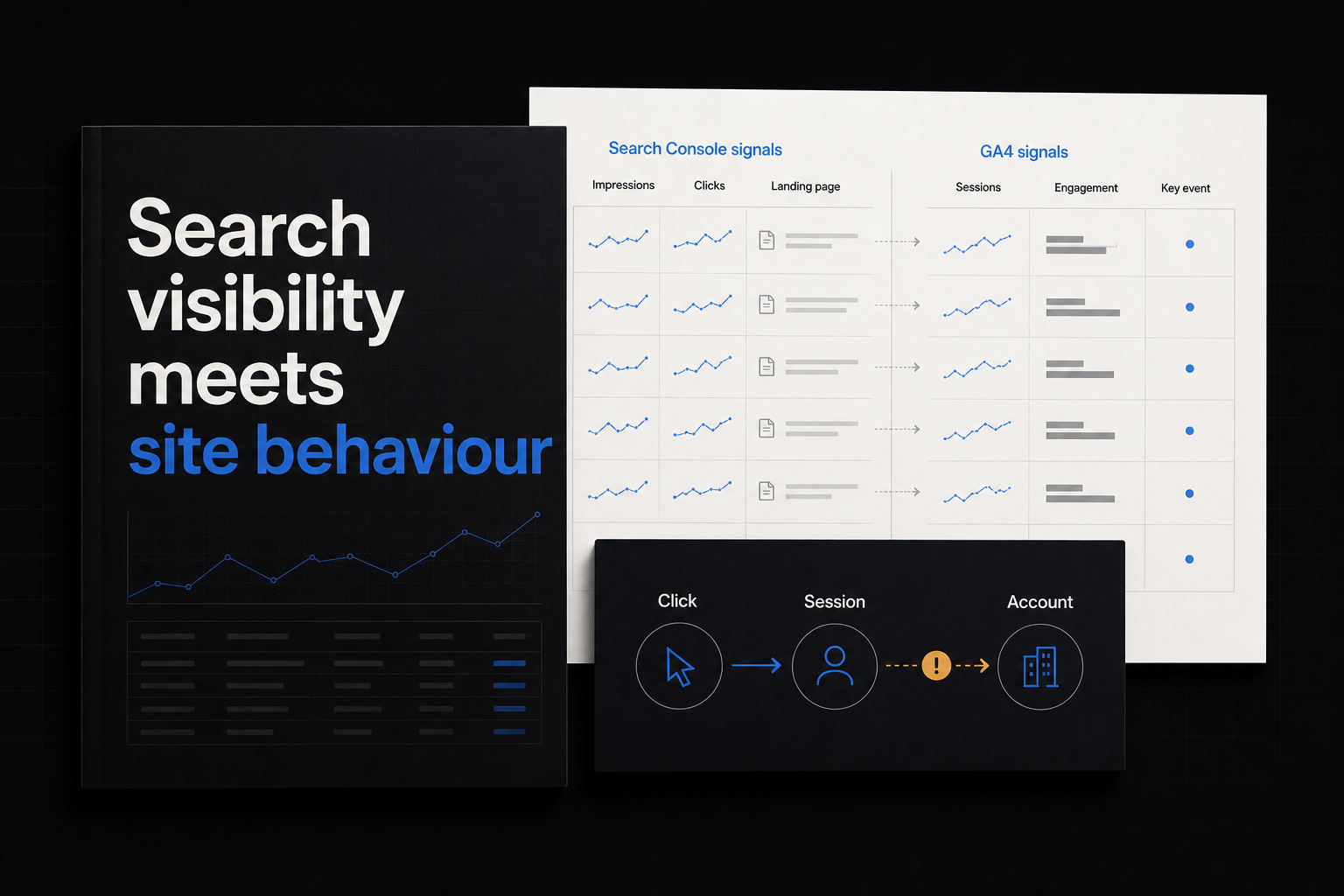
Search Console shows how a site appears and earns clicks in Google Search. GA4 shows measured sessions and behaviour after a visitor reaches the tagged property. Read them together by landing page, but do not treat a Search Console click and a GA4 session as the same event.
Preserve the source boundaries
| Source | Owns | Unit | Important boundary |
|---|---|---|---|
| Search Console | Impressions, clicks, CTR, average position, query/page dimensions | Search appearance/click | Canonical URL aggregation, privacy omissions, California day boundary, delay |
| GA4 | Landing sessions, users, engagement and configured key events | Session/user/event | Requires measurement, consent and a tagged landing page |
Google says Search Console data normally appears after two to three days, uses California local time for daily data and omits some query rows for privacy (Google). Use complete common dates.
Link the products
GA4 can link a web data stream with a Search Console property. The integration exposes an Organic Search Queries report and an Organic Search Traffic report so queries and landing pages can be read with associated source metrics (Google).
Check:
- the GA4 web stream represents the same site;
- the Search Console property covers the intended protocol/domain;
- access roles permit the link;
- canonical and GA4 landing paths can be normalized;
- date, country and device filters are documented.
Build a page-level bridge
Export or report:
| Landing page | Impressions | Clicks | CTR | Organic landing sessions | Engaged sessions | Key events |
|---|
Search Console assigns most performance data to Google’s selected canonical URL; GA4’s landing-page dimension is the page path associated with the first pageview in a session (Google, Google). Normalize host, trailing slash and query-string rules, but keep the original source URLs for audit.
Use a mapping table rather than rewriting source data:
| Search Console canonical | GA4 landing pattern | Reporting page | Note |
|---|---|---|---|
https://example.com/guide/a | /guide/a and /guide/a/ | /guide/a | Strip trailing slash for join |
https://example.com/pricing | /pricing?* | /pricing | Remove non-semantic campaign query |
https://example.com/old | /new | Keep separate until redirect checked | Search may credit canonical/destination differently |
Do not erase country, device or search-type dimensions. Apply the same filters on both sides where possible and record the difference where it is not.
Do not force clicks to equal sessions
A click may not become a measured GA4 session because of consent, blockers, JavaScript failure, redirects, tag absence, property boundaries or timing. One person can also create session behaviour that does not map one-to-one with a Search Console click.
Use the difference as a diagnostic:
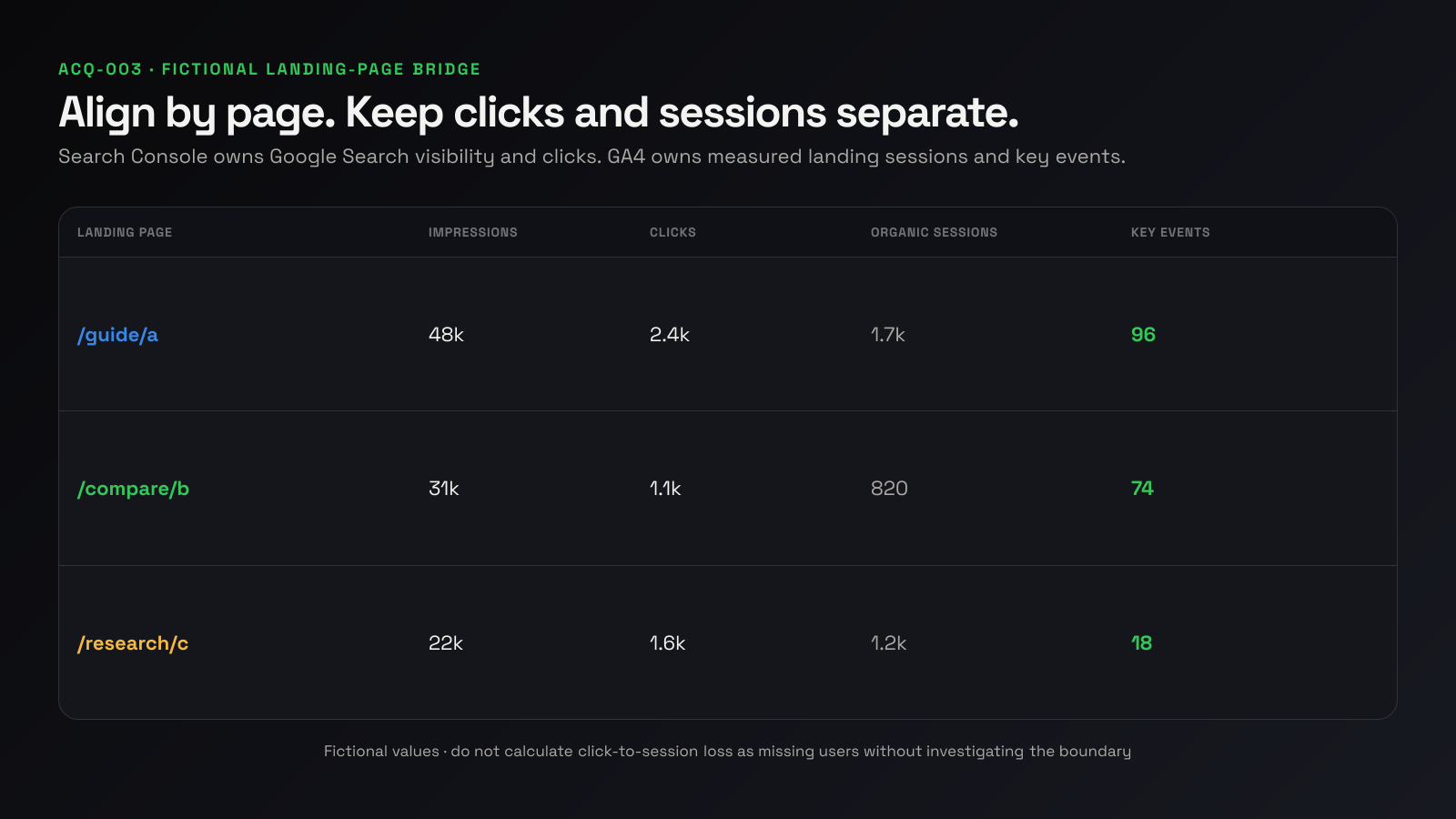
Search Console reports 2,400 clicks to this canonical page; GA4 reports 1,700 organic landing sessions for the aligned complete dates. Check implementation and boundaries before interpreting the gap as lost visitors.
Do not publish “700 users disappeared.”
Read patterns in sequence
Impressions rise, clicks do not
Check query/page mix, CTR, result type and position trend. It can indicate broader visibility without equivalent click demand; it does not prove the title is weak.
Clicks rise, landing sessions do not
Check date boundary, landing tag, redirects, consent and URL mapping.
Sessions rise, key events do not
Check landing intent, audience mix, key-event instrumentation and downstream path. It does not prove organic traffic is low quality.
One page earns visibility but another receives the visit
Search Console can credit the canonical URL even when a duplicate or redirected URL was clicked. Reconcile canonical and destination paths before calling it a reporting error.
Investigate the click-to-session boundary
Use this checklist:
- Confirm both reports cover the same complete dates.
- Compare Search Console’s California day boundary with the GA4 property timezone.
- Test the exact search landing URL in a clean browser.
- Confirm the Google tag loads on the destination after redirects.
- Check consent behaviour and whether analytics storage is denied.
- Check blockers, JavaScript errors and content-security policy.
- Verify the landing page belongs to the linked GA4 stream/property.
- Reconcile canonical, redirected and localized URLs.
- Compare device/country segments for a concentrated gap.
- Record the expected unexplained remainder rather than forcing equality.
The goal is not a 100% click-to-session ratio. It is confidence that a large change is not caused by broken measurement.
Move from page to query carefully
Search Console query rows do not contain every query. Google omits anonymized queries for privacy and stores only the most important rows in the interface, while chart totals can include omitted data (Google).
Use query groups to understand intent, but calculate page-level downstream behaviour in GA4. Do not join a GA4 session or customer to a specific Search Console query unless another valid system provides that evidence.
For example:
| Query group | Search question | Page job | Downstream check |
|---|---|---|---|
| “how to…” | Learn a method | Guide | Engaged session and relevant next step |
| “X vs Y” | Compare options | Comparison | Product/pricing exploration |
| Brand | Navigate/validate | Home/product | Account or commercial event |
Differences in page role can explain downstream rates without making one type of traffic inferior.
Annotate changes
When publishing, redirecting or changing a title, record the date. Compare with similar complete periods, seasonality and site-wide movement. Google cautions that timing alignment does not by itself prove the page change caused a performance change (Google).
Use the annotation to select what to inspect, not as causal proof.
A fictional worked example
| Page | Impressions | Clicks | CTR | Organic sessions | Key events |
|---|---|---|---|---|---|
/guide/a | 48,000 | 2,400 | 5.0% | 1,700 | 96 |
/compare/b | 31,000 | 1,100 | 3.5% | 820 | 74 |
/research/c | 22,000 | 1,600 | 7.3% | 1,200 | 18 |
The research page earns more clicks than the comparison page but fewer key events. That can reflect page role and intent. The next useful check is what key event is appropriate for research visitors and whether assisted or later account creation is captured—not an immediate rewrite based on one ratio.
A weekly workflow
- Select the latest complete dates shared by both sources.
- Compare page-level impressions and clicks.
- Align those pages to GA4 organic landing sessions.
- Add one engagement and one business-relevant key event.
- Flag large movements and measurement gaps.
- Choose one page/query investigation.
Focus more on trends in impressions and clicks than average position alone, consistent with Google’s own Search Console guidance (Google).
Data-quality checks
- Search Console last-updated date covers the reporting end.
- Preliminary days are excluded.
- Page joins are one-to-one or visibly mapped.
- GA4 landing pages have the tag and expected stream.
- Search Console totals are not recomputed by summing incomplete query rows.
- Property/page aggregation is named.
- Internal and test GA4 activity is excluded.
- Key events have stable definitions.
- A source anomaly note is checked when a site-wide discontinuity appears.
Frequently asked questions
Why are Search Console clicks higher than GA4 sessions?
They use different collection and counting methods. Check tagging, consent, blockers, redirects, canonical mapping, dates and property scope.
Can I see Search Console queries in GA4?
Yes, after linking the eligible property and web stream, GA4 exposes Search Console reports. Search Console query privacy limitations still apply.
Which source owns organic traffic?
Search Console owns Google Search visibility and clicks. GA4 owns measured website sessions and configured behaviour. Keep both.
Should I optimize for CTR or key events?
Use CTR to diagnose search-result interaction and downstream key events for the page’s business job. Neither alone is the whole decision.
What belongs in the founder report?
Show organic visibility/click trend, measured organic landing sessions, one downstream outcome, freshness and the page being investigated.
Sources
- Search Console clicks, impressions and position
- Search Console data differences and delay
- Connect Search Console to GA4
- GA4 landing-page report
- Search Console page and query grouping