Article · Updated August 2026
Why MRR never matches Stripe or RevenueCat

Two MRR values can disagree without either system being broken. Each may use a different subscription state, normalization, discount policy, currency rate, cutoff or source history.
Do not start by averaging the totals. Reproduce each definition, reconcile the population and then choose the MRR policy used for the founder report.
MRR is a model, not a cash total
MRR estimates the monthly-normalized recurring value of a defined active subscription population. It is not necessarily:
- cash collected this month;
- gross transaction revenue;
- proceeds after store fees and taxes;
- recognized accounting revenue;
- payouts received;
- annual contract value.
An annual $1,200 subscription may contribute $100 MRR while creating a $1,200 transaction in one month. Expecting those columns to match creates a false discrepancy.
Write the definition for every compared number
| Policy field | Questions |
|---|---|
| Population | Which products, stores, accounts and environments? |
| Active state | Active, trial, past due, grace, cancelled-not-expired? |
| Normalization | How are weekly, monthly and annual products converted? |
| Discounts | Included at list price or net recurring price? |
| Usage | Included, estimated or excluded? |
| Currency | Source currency, display currency and rate date? |
| Time | Instant snapshot, daily close or period end; which timezone? |
| Refunds | Does a refund rewrite historical recurring values? |
| Identity | How are aliases, transfers and migrations handled? |
| Data source | Subscription objects, invoices, receipts or transactions? |
Without this table, “Stripe MRR” and “RevenueCat MRR” are labels, not comparable measures.
Reproduce Stripe first
Stripe Billing documents its MRR definition and configurable treatment. Record the current settings rather than assuming the default:
- which subscriptions contribute;
- when a subscriber becomes active;
- discount treatment;
- delinquent/past-due handling;
- product and account scope;
- currencies and conversion;
- treatment of metered/usage products.
Export the underlying subscription/invoice population when available. Recreate the value per subscription, then total it. The first goal is to match Stripe under Stripe’s rules.
Reproduce RevenueCat separately
RevenueCat says its charts use the current snapshot of stored purchase receipts and can revise historical data when receipts change, such as after a refund. It also documents that its numbers can differ from Apple, Google or Stripe because of migrations, definition differences and estimates such as currency conversion or taxes.
Record:
- project, app, store and product filters;
- production-only chart scope;
- display currency;
- subscription status included at the snapshot;
- aliases/customer identity;
- migrated receipt coverage;
- refund and historical-restatement behavior;
- UTC chart boundaries.
RevenueCat’s overview also distinguishes gross revenue in the last 28 days from current MRR. Do not compare those two cards as if they share a basis.
Keep app-store reporting separate
App Store Connect subscription and proceeds reporting answers store-specific questions. Store fiscal/calendar boundaries, transaction state, proceeds estimates and subscription status can differ from a cross-platform normalized chart.
Use Apple for Apple transaction/proceeds facts, the billing source for its subscription states and your chosen model for canonical MRR. Name the owner per measure instead of declaring one universal source of truth.
Reconcile populations before values
Create a source comparison by subscription/product:
| Difference class | Check |
|---|---|
| Missing subscription | Migration, receipt/API coverage, account/project filter |
| Extra subscription | Sandbox, duplicate identity, cancelled-not-expired state |
| Different amount | Price change, discount, tax/gross basis, product mapping |
| Different interval | Annual/monthly normalization or intro period |
| Different status | Grace, past due, cancellation, expiration, refund |
| Different currency | Display rate and conversion date |
| Different cutoff | Snapshot time, timezone and source refresh |
Count subscriptions in each class and total their MRR effect. Do not inspect only the grand total.
Build a subscription-level comparison file
Use one row per canonical subscription at the same snapshot time:
| Field | Purpose |
|---|---|
| Canonical subscription key | Join the same commercial relationship |
| Source/store and account | Preserve the owning system |
| Source subscription/receipt ID | Trace back without relying on display name |
| Product and interval | Normalize only mapped recurring products |
| Original price/currency | Preserve source truth |
| Discount/intro state | Explain net recurring amount |
| Start, current period end, cancelled and expired times | Reproduce lifecycle policy |
| Billing/grace state | Separate open exposure from final loss |
| Source MRR contribution | Recreate the displayed definition |
| Canonical MRR contribution | Apply the chosen contract |
| Difference code | Group the reconciliation |
Do not place payment card data or unnecessary personal fields in this file. Use stable source identifiers and restrict access.
Validate totals in this order:
- reproduce the number of contributing subscriptions in each source;
- reproduce source MRR contribution by product/store;
- identify unmatched or duplicate records;
- apply one canonical adjustment class at a time;
- prove the bridge arithmetic;
- store the snapshot and configuration used.
This prevents several small differences from being hidden inside one unexplained “other” row.
A fictional reconciliation
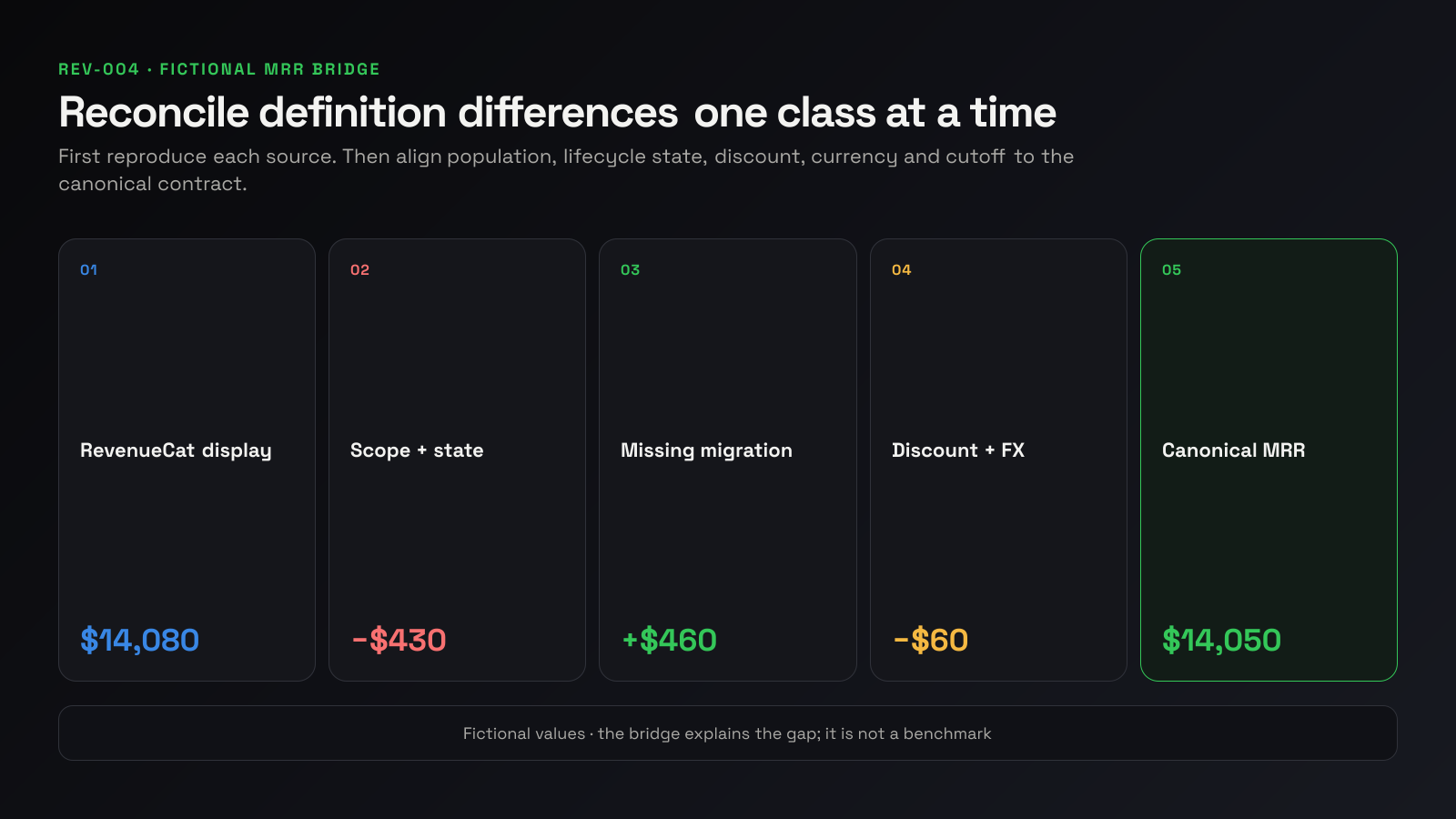
| Bridge from RevenueCat to canonical MRR | Amount |
|---|---|
| RevenueCat displayed MRR | $14,080 |
| Remove sandbox/mis-scoped product | −$120 |
| Exclude cancelled-not-expired under canonical policy | −$310 |
| Add migrated Stripe subscriptions missing receipts | +$460 |
| Apply canonical discount treatment | −$95 |
| Apply canonical currency snapshot | +$35 |
| Canonical MRR | $14,050 |
Then reconcile Stripe:
| Bridge from Stripe to canonical MRR | Amount |
|---|---|
| Stripe displayed MRR | $10,420 |
| Add app-store recurring value | +$3,760 |
| Remove usage estimate excluded by policy | −$170 |
| Apply status/discount/currency differences | +$40 |
| Canonical MRR | $14,050 |
These values are fictional. The bridge proves how each displayed total reaches the same policy; it does not claim that these adjustment classes occur everywhere.
Treat cancellation and expiration carefully
A customer can disable renewal while remaining active until the paid period ends. RevenueCat’s status and churn documentation distinguishes cancelled-not-expired subscriptions from churn at expiration. A model that removes value at cancellation will differ from one that retains it until expiration.
Neither is meaningful without a label. For operating MRR, choose the policy that reflects the recurring value question and keep cancellation-risk exposure as a separate measure when useful.
Handle grace and billing issues deliberately
Past-due and grace-period subscriptions may remain active or be treated differently by source configuration. Record:
- entitlement status;
- payment/retry status;
- whether MRR remains in the source total;
- recovery deadline;
- canonical inclusion policy.
Find failed payments before they become churn describes the incident lifecycle. Keep unresolved exposure separate from final involuntary loss.
Control product and currency mappings
Maintain:
| Source product | Canonical product | Interval | Recurring class |
|---|---|---|---|
price_web_pro_monthly | Pro | Monthly | Recurring |
ios.pro.annual | Pro | Annual | Recurring |
android.pro.lifetime | Lifetime | One-time | Excluded from MRR |
For currency, retain original amount/currency and record reporting currency, rate source, rate timestamp and rounding. A live display rate will change the total even when the subscription population is unchanged.
Diagnose common mismatch patterns
The gap equals annual-plan cash
You are probably comparing transaction revenue with normalized MRR. Reproduce annual subscription contribution as price divided by the stated monthly normalization; keep cash separate.
The gap appears after a migration
Check which historical receipts or subscriptions were imported, when customers were first seen and whether the new system can reconstruct the prior lifecycle. Keep an explicit “not represented in source chart” class.
The gap grows around cancellations
Compare cancellation time, paid-through/expiration time and each policy’s removal point. Report scheduled-to-cancel MRR separately if it matters operationally.
History changes after refunds
Identify which source restates historical revenue or subscription state from current receipts. Store published snapshots if the founder report must explain a previously reported value.
The total moves without customer events
Check currency conversion, price/product mapping, source configuration, late receipt refresh and timezone cutoff before interpreting it as growth or churn.
Only one product or store is wrong
Reconcile that segment before changing the global formula. A missing mapping or store-specific lifecycle rule is more likely than a universal MRR failure.
Freeze a canonical MRR contract
Define:
- included products and sources;
- active-state policy;
- trial, discount, usage and tax treatment;
- normalization formula;
- currency policy;
- reporting cutoff/timezone;
- update/restatement policy;
- owner and version.
Store the source configuration snapshot beside it. If the contract changes, annotate or restate history. Do not splice two definitions into one trend line.
Put the discrepancy in the founder report
Show:
- canonical beginning and ending MRR;
- new, expansion, reactivation, contraction and churn;
- unresolved billing exposure;
- source difference requiring action;
- source freshness.
Example:
Ending canonical MRR is $14,050. RevenueCat displays $14,080 because the source view includes $310 cancelled-not-expired value, omits $460 of migrated Stripe subscriptions and applies different discount/currency treatment. The bridge reconciles fully; no ingestion incident is open.
That is more useful than “MRR is wrong.”
Frequently asked questions
Which MRR is correct?
Each can be correct under its documented policy. Choose a canonical policy for the business question and reconcile every source to it.
Should cancelled subscriptions stay in MRR?
Define whether MRR reflects currently active paid access or expected renewal. If you retain cancelled-not-expired value, show scheduled cancellation exposure separately.
Why did historical RevenueCat numbers change?
RevenueCat documents that charts are based on current receipt snapshots; refunds and other receipt changes can revise history.
Why does MRR not match this month’s revenue?
MRR normalizes recurring subscription value. Transaction revenue reflects purchases/refunds in a period and may contain annual or one-time value.
Should we build our own calculation?
Only when the business needs a policy different from source displays and can own mappings, lifecycle state, correction handling and validation.
Sources
- Stripe Billing analytics and MRR definitions
- RevenueCat charts and data differences
- RevenueCat overview metrics
- Apple subscription analytics
- Founder noticing cancelled subscriptions in RevenueCat MRR
- Manual Stripe MRR calculation discussion
- Stripe MRR calculation discussion